Free Virtual Conference – Climbing the SharePoint Summit
May 18, 2010
HOW TO: Create a Sandbox Compatible Visual Web Part with the Visual Studio 2010 SharePoint Power Tools
June 21, 2010Automating Windows 7 Boot Entry Creation With PowerShell
Recently I needed to create an automated process to make boot entries for developer lab machines to allow them to boot to a virtual hard disk (VHD). The main requirements were to make the process simple and easily configurable. In this blog post I’ll show you the PowerShell script and accompanying XML settings file I used to get the job done.
Configuration file
The following XML configuration file (settings.xml) stores the settings for the boot entry. It allows you easily configure where the VHD is located and the description you would like to give to the boot entry. The Drive, Path, and Description values are extracted by the PowerShell script and used to configure the new boot entry.
<?xml version="1.0" encoding="utf-8"?>
<Settings>
<BootEntry Drive="C" Path="VHDsSP2010.VHD" Description="Boot To SP 2010 VHD" />
</Settings>
PowerShell Script
[System.Xml.XmlElement]$settings = Get-Settings
$BootEntry = $settings.BootEntry
$Drive = $BootEntry.Drive
$Path = $BootEntry.Path
$Description = $BootEntry.Description
Then it copies the current boot entry and assigns it the description from the settings.xml file.
$BootEntryCopy = bcdedit /copy '{current}' /d $BootEntry.Description
Then the script extracts the GUID for the new boot entry.
$CLSID = $BootEntryCopy | ForEach-Object {$_.Remove(0,37).Replace(".","")}
Then it uses the values from the settings.xml file to create the path to the VHD which bcdedit uses to modify the boot entry.
$VHD = 'vhd=[' + $Drive + ':]' + $Path
Finally, the script calls bcdedit to configure the boot entry.
bcdedit /set $CLSID device $VHD
bcdedit /set $CLSID osdevice $VHD
bcdedit /set $CLSID detecthal on
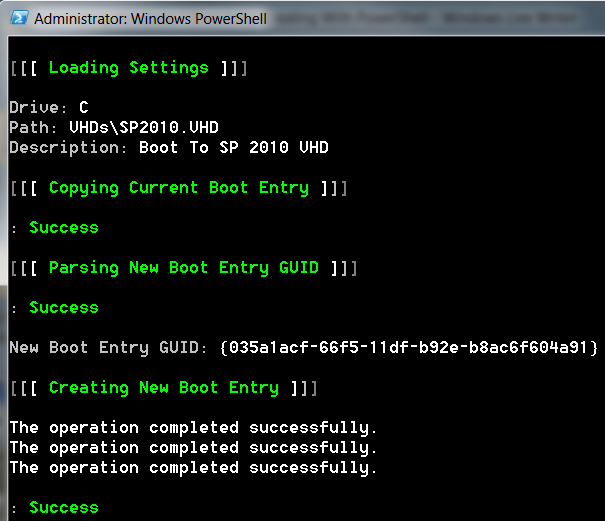
The script output looks like this when it is run. (Your GUID will differ from the screenshot.)
Enjoy the script, I hope it helps you out!
Thanks to my buddy Gary Lapointe for showing me how to make XML settings files with PowerShell!
Thanks to Chris Mayo for showing me how to use BCDEDIT to make custom boot entires. His blog series that describes how to make bootable VHDs is excellent.